
Launching a live streaming channel involves far more than picking the most popular platform on the market. Aspiring creators, educators, and VTubers frequently select a streaming service based purely on market hype, only to encounter insurmountable technical bottlenecks during production.
A competitive gamer might find their high-motion gameplay severely blurred by conservative platform bitrate caps; a coding instructor might discover that screen-share text is rendered illegible due to poor video scaling; or a virtual broadcaster might struggle to preserve background alpha transparency without green-screen artifacts.
The “ideal” live streaming platform does not exist in isolation. Long-term production success depends entirely on matching your specific content category – Gaming, Talk/Podcasts, Education, or Virtual Broadcasting – to a platform’s ingest limits, encoder compatibility, audio routing pipelines, and VOD retention policies.
Technical priorities for fast-paced gaming broadcasts
Live gaming broadcasts place extreme demands on video encoding. High-motion gameplay – such as fast-paced First-Person Shooters (FPS) or racing titles – requires rapid screen refreshes and high data allocation to prevent compression blockiness (pixelation).
Bitrate ingest caps and frame rates
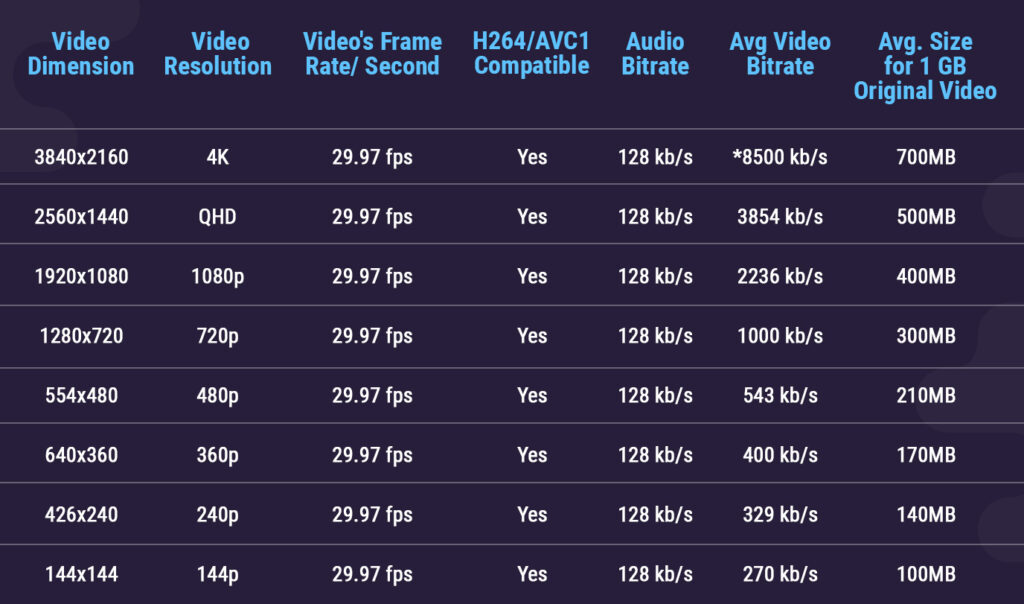
The primary technical bottleneck for gaming is the platform’s maximum ingest bitrate. Bitrate represents the amount of data transmitted per second from your streaming software (such as OBS Studio) to the platform server:
- Twitch: Enforces conservative ingest caps (typically 6,000 to 8,000 kbps). While sufficient for slow-paced games, fast-motion 1080p 60fps gameplay can suffer from compression artifacts.
- YouTube Live: Accepts extremely high bitrates (up to 20,000+ kbps for 1440p and 4K streams). YouTube’s server-side transcoding allows high-motion gameplay to look noticeably sharper, provided the broadcaster has sufficient upload bandwidth.
- Kick: Offers high bitrate limits without aggressive pre-transcoding compression, making it popular for high-action gaming streams.
Low Latency Mode vs. picture fidelity
Broadcasters must balance real-time chat interaction against image quality. Enabling “Low Latency Mode” on Twitch or YouTube reduces the delay between the creator’s action and the viewer’s screen to under 2 seconds. However, this shrinks the player’s video buffer, making the stream far more susceptible to dropped frames or micro-stutters during sudden network fluctuations.
Platform ingest specifications and encoder profile alignment
To evaluate how technical requirements shift across different content styles, the following operational breakdown aligns streaming categories with their necessary software inputs and platform infrastructure:
| Content category | Core encoder requirement | OBS & software pipeline | Critical platform feature |
| Fast-Paced Gaming | High bitrate ingest, 60fps support, low latency. | Hardware encoding (NVENC/AV1), high-bitrate OBS profile. | High maximum bitrate caps and reliable local edge servers. |
| Talk Shows & Podcasts | Audio clarity, multi-guest VoIP integration. | Multi-track audio routing, noise suppression filters (RNNoise). | Robust automated chat moderation and subscriber emotes. |
| Educational & Coding | Crisp text rendering, high-res screen capture. | Window capture (1440p/4K), scene collection presets. | Permanent VOD retention and custom chapter markers. |
| Virtual Broadcasting (VTuber) | Alpha transparency, motion capture tracking. | Spout2 capture plugin, Virtual Camera (VSeeFace/Animaze). | Clear commercial avatar licensing and TOS guidelines. |
Audio architecture and VOD retention for talk and educational streams
Unlike gaming, talk shows, podcasts, and educational broadcasts prioritize crystal-clear audio delivery, readable visual text, and long-term searchable archives over high frame rates.
Multi-track audio routing and noise suppression
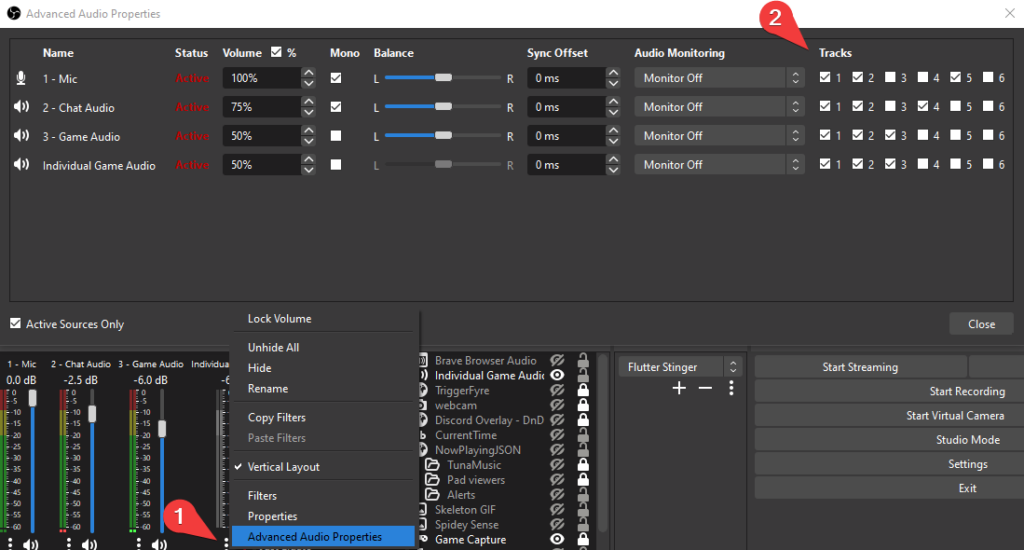
For talk shows featuring remote guests via Discord or Zoom, basic single-track audio recording is insufficient. Professional broadcasters utilize multi-track audio routing within OBS Studio. By separating microphone input, guest VoIP calls, and background media into independent audio tracks, creators can adjust volume levels independently during live broadcasts and export clean, isolated dialogue tracks for post-stream editing or podcast distribution. Furthermore, applying VST noise-suppression plugins (such as RNNoise) ensures clear vocal delivery without background fan noise.
High-resolution screen capture and permanent VOD archiving
Educational broadcasts (like coding tutorials or digital art masterclasses) require exact pixel rendering. Broadcasters must capture screens at native 1440p or 4K resolutions and utilize high-resolution downscaling to prevent mathematical formulas or code lines from blurring.
Equally critical is VOD (Video-on-Demand) retention. Platforms like Twitch automatically delete un-archived VODs after 14 to 60 days, destroying valuable educational reference material. YouTube Live remains the premier platform for educational broadcasters because live streams automatically convert into permanent, searchable, monetizable VODs with support for interactive chapter markers.
Virtual broadcasting and VTuber software integration
Virtual Broadcasting (VTubing) replaces traditional webcam feeds with animated 2D (Live2D) or 3D (VRM) avatars driven by facial tracking software (such as VSeeFace, Animaze, or Luppet). This niche introduces unique software pipeline requirements.
Virtual camera feeds, Spout2, and alpha transparency
In a standard webcam setup, background removal relies on physical green screens or AI background-removal filters. VTubers, however, generate digital avatars with native transparency.
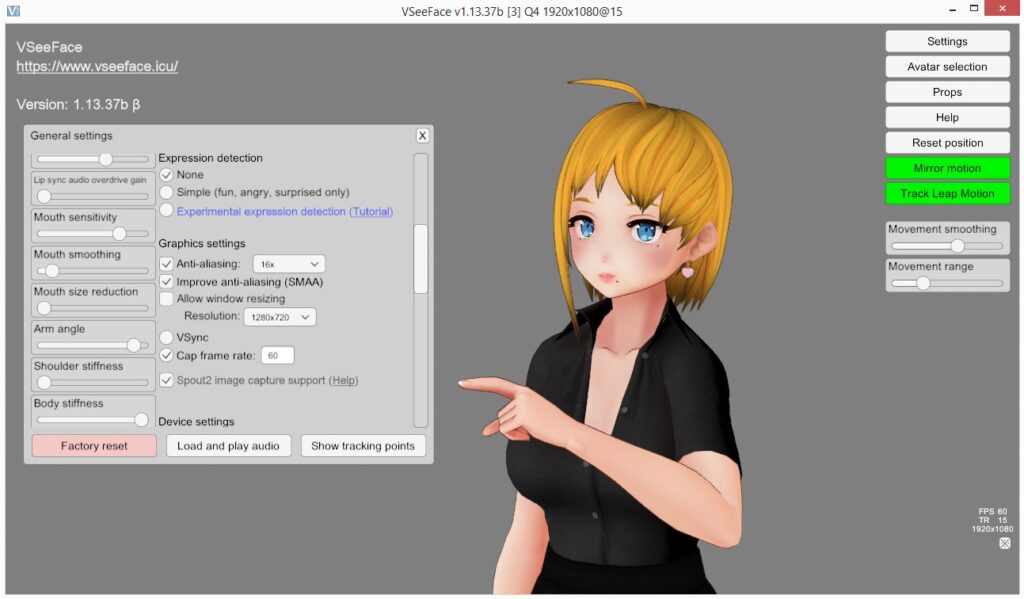
To composite a 3D avatar over game footage without ugly green borders, broadcasters avoid window capture and instead utilize Spout2 or Virtual Camera memory sharing. Spout2 transmits raw graphics data directly from the VTuber tracking software into OBS Studio via GPU memory, preserving true 16-bit alpha channel transparency and eliminating color-keying artifacts entirely.
Commercial licensing and avatar asset copyright
Before monetizing a virtual broadcasting channel, creators must audit the legal terms of their 3D model assets. Many 3D character assets purchased on marketplaces (like Booth or VRChat stores) grant non-commercial usage rights by default. Broadcasters must confirm that their avatar model, custom textures, and tracking software licenses permit commercial monetization, channel subscriptions, and merchandise sales on their chosen platform.
Troubleshooting multi-format production and resource bottlenecks
- Managing multi-category streams on a single platform profile: Broadcasters can seamlessly switch between gaming and talk show streams on the same account by utilizing OBS Studio’s built-in Scene Collections and Profiles. Configure a “Gaming Profile” set to 1080p 60fps at high bitrate with low latency, and switch to a “Talk Show Profile” tuned for 1080p 30fps with multi-track audio routing before going live. Be sure to update your platform directory category (e.g., changing from “Valorant” to “Just Chatting”).
- Differentiating screen-capture pipelines for educational tutorials: Educational broadcasts do not require separate streaming software, but they demand different encoder settings. Set your OBS canvas and output resolution to match your monitor’s native display (1440p or 4K) at a lower frame rate (30fps) to maximize text sharpness for code or formulas rather than motion smoothness.
- Mitigating GPU resource contention during 3D avatar rendering: Before going live with a complex 3D VTuber avatar, run an unlisted test stream to monitor GPU utilization. Rendering a high-polygon 3D avatar alongside a demanding modern game on a single GPU can trigger dropped frames. If your GPU hits 100% capacity, limit the avatar software’s rendering frame rate to 30fps or delegate motion tracking to a secondary mobile device via NDI.